
|
Getting your Trinity Audio player ready...
|
Download the full PDF “How to Delete Order History on Amazon (2026)” guide for offline reading.
How to Delete Order History on Amazon (2026 Privacy Guide)
Online shopping is convenient—but it’s also personal. Orders can reveal gifts, health items, or simply things you’d rather keep private on a shared account. If you’ve searched for how to delete order history on Amazon, you’re not alone. In 2026, privacy expectations are higher than ever, and users want clear, honest answers.
Here’s the straight truth upfront: Amazon does not allow permanent deletion of order history. However, you can hide orders, reduce visibility, and limit how your data is used. This guide explains exactly what’s possible, what isn’t, and how to protect your privacy—step by step—without gimmicks or myths.

Why People Want to Delete Amazon Order History
Most readers land here for practical reasons:
- Shared accounts with family or roommates
- Surprise gifts you don’t want spoiled
- Sensitive purchases (medical, personal, or financial)
- General privacy control and cleaner recommendations
Amazon retains order records for billing, returns, warranties, and legal compliance. That’s why full deletion isn’t offered—but privacy-friendly options exist.
Can You Permanently Delete Amazon Order History?
Short answer: No.
Long answer: Amazon keeps order records for legitimate reasons—taxes, invoices, refunds, warranties, and fraud prevention. This aligns with standard e-commerce practices and consumer protection rules.
What you can do:
- Archive (hide) orders from the main Orders page
- Clear browsing history to stop recommendation tracking
- Limit household visibility
- Tighten account security
Think of archiving as moving items to a locked drawer—not shredding the receipt.
You May Also Read – Facebook Account Disabled? How to Recover It Quickly in 2026
Delete vs. Hide vs. Archive: What’s the Difference?
Understanding these terms prevents frustration.
- Delete: Not supported for orders.
- Hide: Informal term users use for archiving.
- Archive: Official Amazon feature that removes orders from your default Orders list.
What archiving does
- Removes the order from the main Orders view
- Keeps invoices and return info intact
- Allows you to unarchive later if needed
What archiving doesn’t do
- It doesn’t erase records
- It doesn’t remove items from Amazon’s backend systems
How to Hide (Archive) Amazon Order History on Desktop
This is the most reliable method.
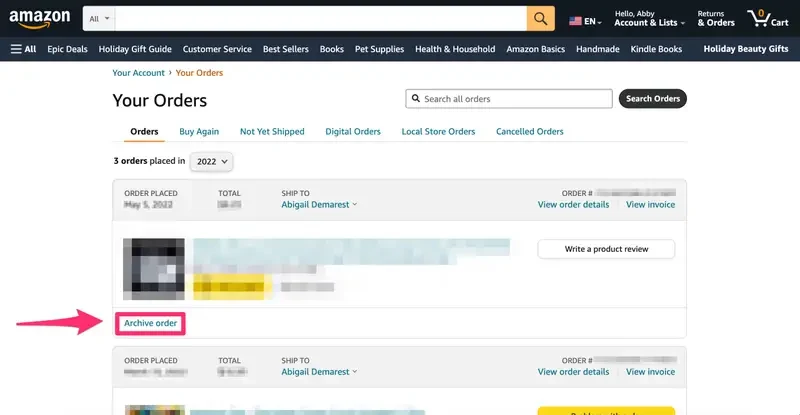
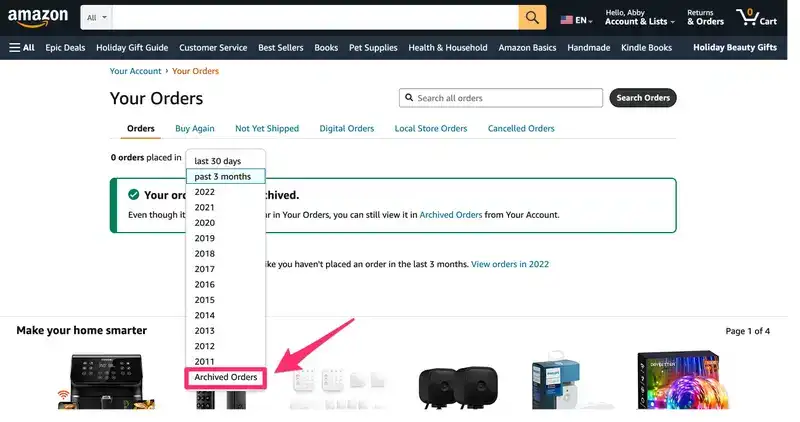
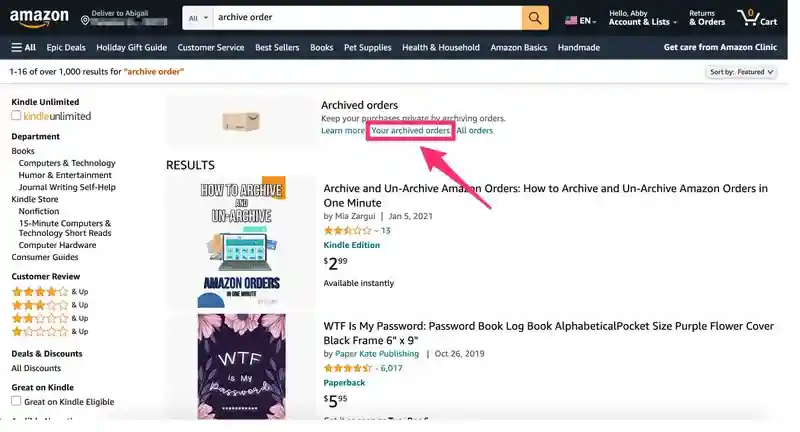
Steps
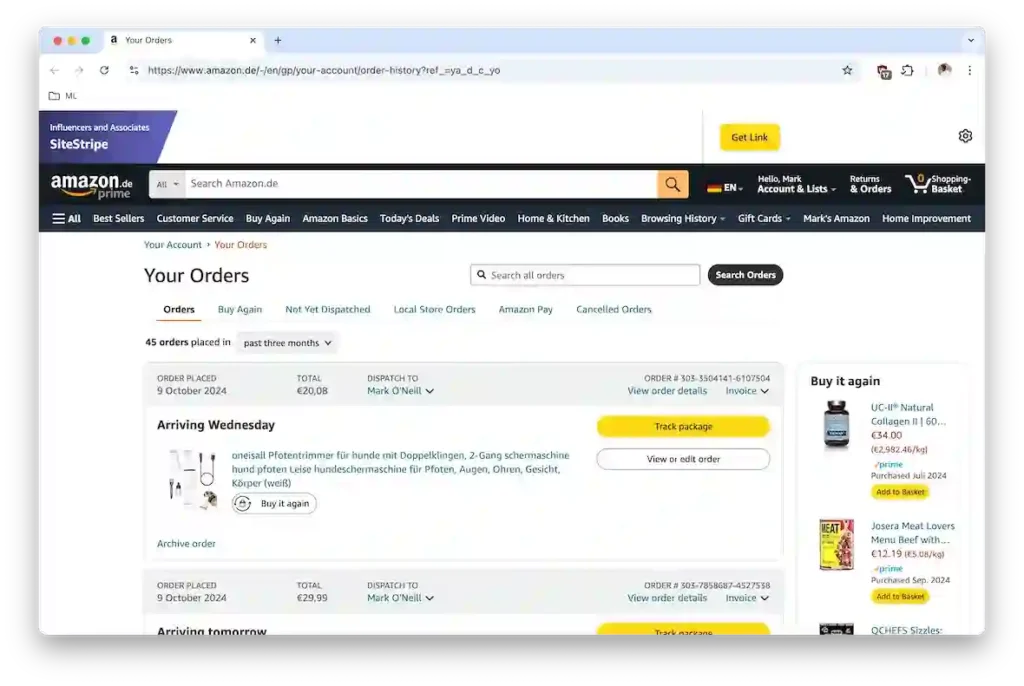
- Sign in to Amazon on a desktop browser.
- Go to Accounts & Lists → Orders.
- Find the order you want to hide.
- Select Archive order.
- Confirm.
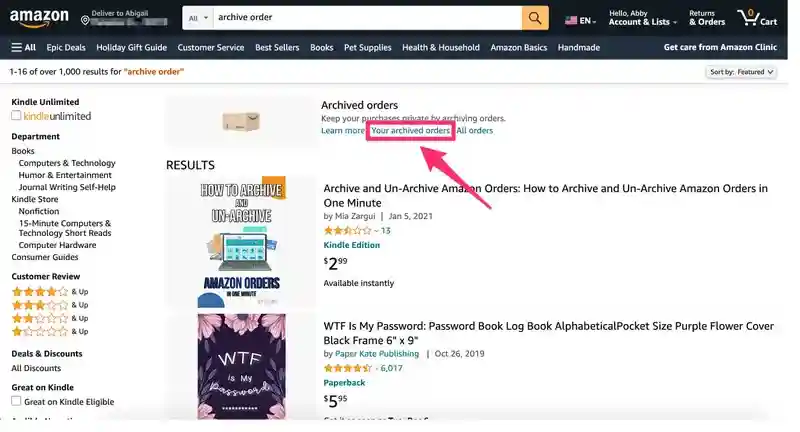
Where do archived orders go?
They move to Accounts → Archived Orders. Only you can see them while logged in.
Tip: You can archive many orders over time, but Amazon caps the total number (the limit can change). If the option disappears, you may have reached it.
You May Also Read – Best VPN for Mac in 2026 (Free & Paid Options)
How to Hide Amazon Orders on Mobile (Android & iPhone)
The Amazon app still doesn’t offer an archive button.
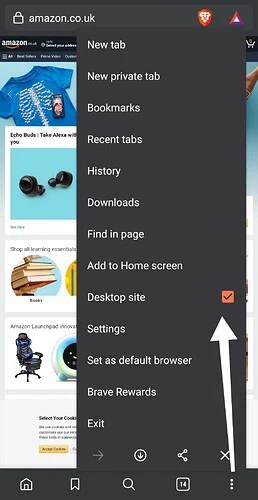
Workaround
- Open a mobile browser (Chrome/Safari).
- Visit Amazon and request Desktop Site.
- Go to Orders and follow the desktop steps above.
Common mistake: Clearing the app cache or browsing history won’t hide orders. Archiving must be done from the desktop site.
How to View, Unarchive, or Restore Archived Orders
Need to access a receipt or warranty later? Easy.
Steps
- Accounts & Lists → Archived Orders
- Find the order
- Select Unarchive order
Once unarchived, it returns to your regular Orders list.
You May Also Read – Cyber Attacks Explained: Real Examples, Modern Threats & How to Stay Safe (2026)
Remove Order History From Recommendations (Important)
Even if orders are archived, Amazon’s recommendations can still feel… too accurate. That’s because browsing history fuels them.
Do this
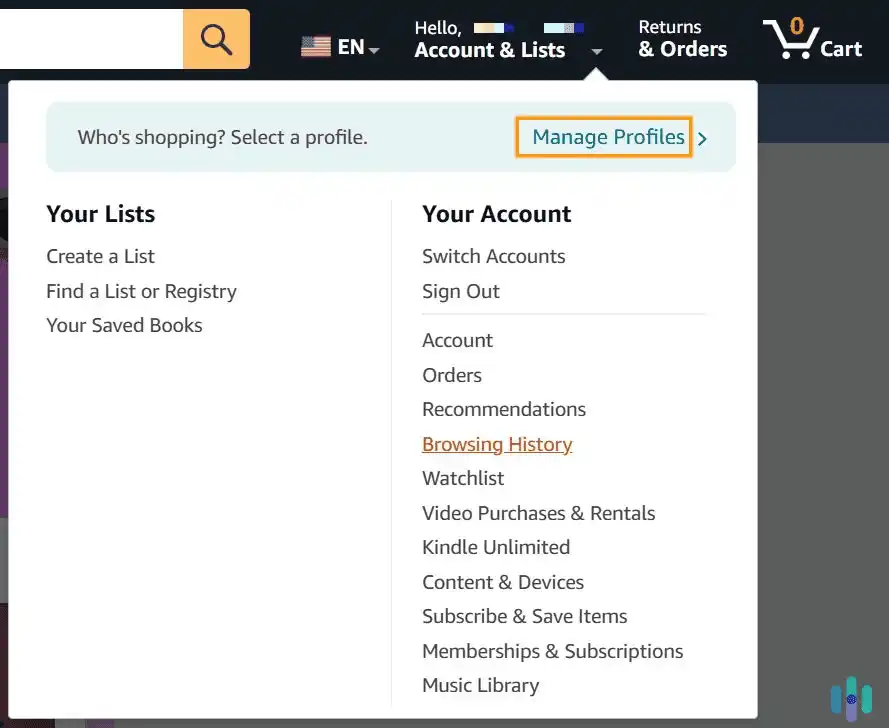
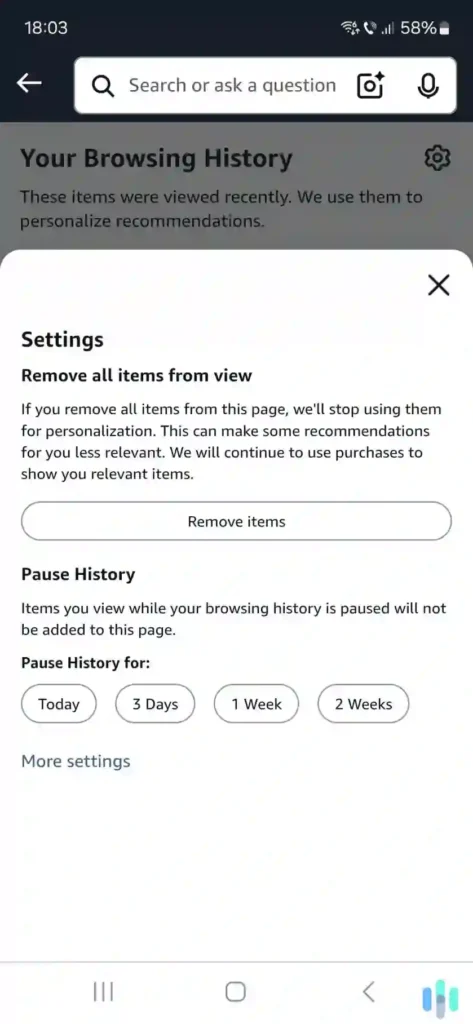
- Go to Browsing History
- Select Remove all items
- Toggle Turn Browsing History on/off → Off
Result: Fewer reminders of past purchases and better privacy—without affecting your order records.
Hide Orders From Amazon Household Members
Amazon Household shares benefits but complicates privacy.
What to know
- Adult profiles can see shared content depending on settings
- Teens have limited views
- Archiving helps, but it’s not foolproof in shared setups
Best practices
- Use separate adult accounts for private purchases
- Avoid sharing login credentials
- Review Household sharing permissions regularly
You May Also Read – Cybersecurity Tips: Simple Ways to Stay Safe Online in 2026
Does Deleting Your Amazon Account Remove Order History?
Closing your account is the nuclear option.
What happens
- Your account becomes inaccessible
- Orders are no longer visible to you
- Amazon may retain certain records for legal and financial reasons
Before you do this
- Download invoices and warranties
- Resolve refunds and returns
- Understand you’ll lose access to digital purchases
Account deletion is rarely necessary just for privacy.
Amazon Order History Privacy Tips (2026) – How to delete order history on Amazon
Small changes add up.
- Enable two-step verification
- Remove saved cards you don’t use
- Disable Alexa voice purchase history if applicable
- Use a separate account for sensitive items
- Review devices signed into your account
These steps reduce accidental exposure and unauthorized access.
Common Problems (and Quick Fixes)
- Archive option missing: Use the Amazon desktop website or switch your mobile browser to desktop mode. You may have reached the archive limit.
- Orders still visible: Make sure you archived the order, not just cleared browsing history.
- Can’t hide orders in the app: The Amazon app doesn’t support archiving—use a browser instead.
- Family can see purchases: Avoid shared logins and review Amazon Household settings.
- Old items affect recommendations: Clear and turn off Amazon browsing history.
Conclusion: The Best Way to Keep Amazon Order History Private
In conclusion, deleting Amazon order history permanently is not possible, but you can still take effective steps to protect your privacy in 2026. By archiving orders, clearing and disabling browsing history, and managing Amazon Household settings, you can keep your purchases hidden from shared accounts and unwanted visibility. Understanding the difference between deleting, hiding, and archiving orders helps avoid confusion and saves time. For better long-term privacy, secure your account with two-step verification and avoid sharing login details. These simple actions make a big difference in controlling your Amazon order history privacy while continuing to shop safely and confidently.
FAQs
1. Can I permanently delete my Amazon order history?
No. Amazon does not allow users to permanently delete order history. Orders can only be archived (hidden) for privacy reasons.
2. How do I hide Amazon orders from my family?
You can archive orders from the Amazon desktop website. For better privacy, use separate Amazon accounts instead of sharing one login.
3. Does clearing Amazon browsing history delete order history?
No. Clearing browsing history only affects product recommendations. It does not remove or hide past orders.
4. How many Amazon orders can I archive?
Amazon allows archiving a limited number of orders. If you reach the limit, the “Archive Order” option may no longer appear.
5. Can archived Amazon orders be seen again?
Yes. Archived orders can be viewed and unarchived anytime from the “Archived Orders” section in your account settings.
6. How do I delete Amazon order history on the mobile app?
You cannot archive orders directly in the Amazon app. You must use a mobile browser in desktop mode to hide orders.
7. Will deleting my Amazon account remove order history?
Deleting your account removes your access, but Amazon may still retain order data for legal, billing, and compliance reasons.
8. Can Amazon customer support delete my order history?
No. Amazon customer support does not have the ability to delete or remove order history from any account.
9. Why does Amazon keep my order history permanently?
Amazon keeps order history for invoices, returns, warranties, tax records, and fraud prevention purposes.
10. How can I keep my Amazon purchases private?
Archive orders, clear and disable browsing history, enable two-step verification, and avoid sharing your Amazon account.
Written by Pavan Kumar
IT professional and tech blogger at Nexdigit. I write about smartphones, software, and everyday tech in a simple, honest way so readers can understand what really matters before buying or updating.