|
Getting your Trinity Audio player ready...
|
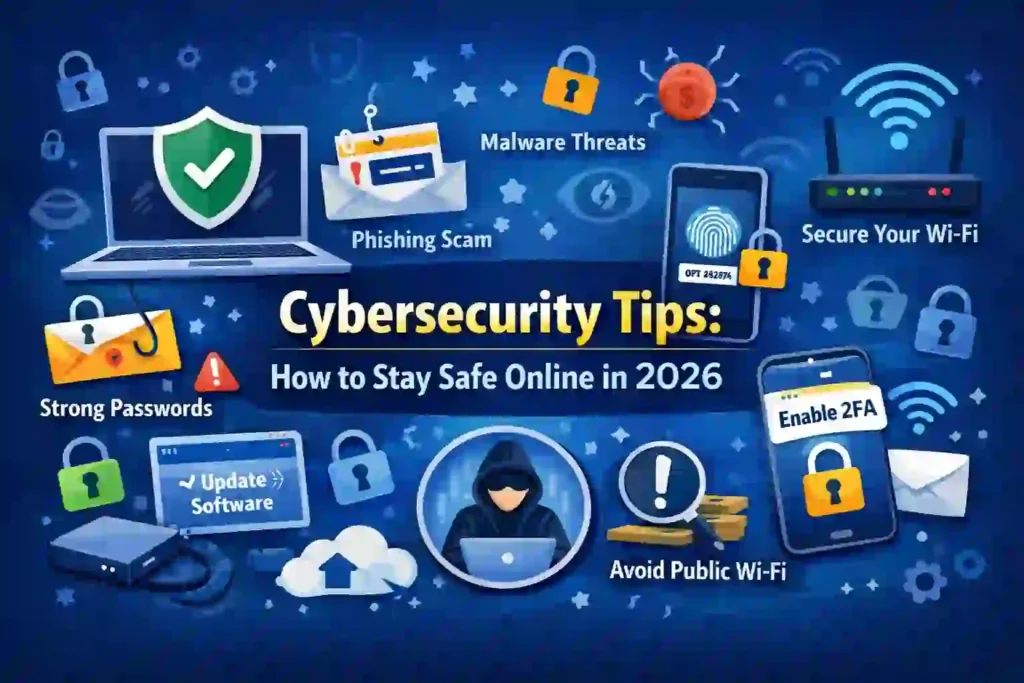
Cybersecurity Tips: Simple Ways to Stay Safe Online in 2026
In my experience as an IT professional, many people believe cybercrime only affects big companies. This is not true.
Many Nexdigit readers contact us after losing data, money, or social media accounts—often due to very simple mistakes.
Today, we use the internet for everything:
banking, shopping, emails, work, photos, and even health records. This makes everyday users an easy target for hackers.
Cybercriminals do not care who you are.
They look for weak passwords, old software, and careless clicks.
The good news?
You do not need to be a tech expert to stay safe.
This guide shares practical cybersecurity tips that I personally use and recommend. Everything is explained step by step, in clear language, without technical confusion.
By the end of this article, you will know:
- Common cyber threats
- Simple ways to protect your data
- How to avoid online scams
- How to keep your devices safe in 2026
Let’s start.
What Is Cybersecurity? (In Simple Words)
Cybersecurity means protecting your digital life.
This includes:
- Your phone and computer
- Your emails and passwords
- Your photos, files, and messages
- Your money and online accounts
Think of cybersecurity like locking your home.
You use locks, lights, and alarms to stay safe. Online safety works the same way.
Top 10 Cybersecurity Threats: How to Protect Yourself Online
Common Cyber Threats You Should Know About
1. Phishing Scams
Phishing is when fake emails or messages trick you into sharing passwords or bank details.
Example:
“You won a prize. Click here.”
In my experience, phishing is the most common attack faced by beginners.
2. Malware and Viruses
Malware is harmful software that damages your device or steals data.
It often comes from:
- Fake apps
- Free downloads
- Unsafe websites
3. Ransomware
This locks your files and asks for money to unlock them.
Even home users are targeted now.
4. Weak Password Attacks
Hackers use software to guess easy passwords like:
- 123456
- password
- yourname123
5. Public Wi-Fi Risks
Free Wi-Fi in cafes or airports is often unsafe.
Hackers can see what you do online.
6. Identity Theft
Hackers steal personal information such as ID details, bank data, or login credentials. This stolen information is often used for fraud, fake accounts, or illegal purchases.
- Hackers steal personal information like ID details and bank data
- Stolen data is used for fraud or illegal purchases
- Victims often notice the problem too late
How to Protect Your Phone from Hackers: Top Security Tips
7. Social Engineering Attacks
In these attacks, criminals manipulate people instead of hacking systems. They rely on trust and emotions to get sensitive information.
- Attackers trick users instead of hacking systems
- They pretend to be trusted people or companies
- Emotional pressure is commonly used
8. Fake Websites
Fake websites are designed to look exactly like real and trusted sites. Their main goal is to steal login details or payment information.
- Fake sites look like real and trusted websites
- They steal login details and payment information
- Often shared through ads or scam links
9. Spyware
Spyware secretly runs in the background without the user’s knowledge. It monitors activity and collects private data over time.
- Spyware runs secretly in the background
- It tracks activity and records passwords
- Devices may become slow or unstable
10. Account Takeover Attacks
Account takeover happens when hackers gain control of your online accounts. This often leads to locked accounts and data misuse.
- Hackers gain access using stolen passwords
- They lock users out of their own accounts
- Email and social media accounts are common targets
Cybersecurity Tips Everyone Should Follow
1. Use Strong and Unique Passwords
A strong password has:
- Uppercase letters
- Lowercase letters
- Numbers
- Symbols
Bad password: Nexdigit123
Good password: N3x!Dg#29@
Best Practice
- Use a password manager (LastPass, Bitwarden)
- Never reuse passwords
How I Keep My Personal Data Safe: Simple Best Tips
2. Turn On Two-Factor Authentication (2FA)
2FA adds an extra step after your password.
Usually:
- SMS code
- App notification
- Email confirmation
Even if someone steals your password, they can’t log in.
3. Keep Your Software Updated
Outdated software is a hacker’s favorite target.
Always update:
- Windows / macOS
- Android / iOS
- Browsers (Chrome, Edge, Firefox)
Enable automatic updates if possible.
4. Be Careful With Emails and Messages
Before clicking:
- Check sender address
- Look for spelling mistakes
- Avoid urgent messages
In my experience, real companies never rush you.
5. Install Trusted Security Software
Good antivirus tools include:
- Windows Defender (built-in)
- Bitdefender
- Norton
- Kaspersky
Free is okay for basic use, but paid versions offer better protection.
6. Secure Your Wi-Fi Network
Wi-Fi Safety Tips
- Change router default password
- Use WPA3 or WPA2 encryption
- Hide admin login
Avoid sharing Wi-Fi passwords publicly.
7. Avoid Public Wi-Fi for Sensitive Work
Never do:
- Banking
- Shopping
- Office work
If needed, use a VPN (NordVPN, Surfshark).
How to Protect Your Phone from Hackers in 2025 – 13 Proven Tips
8. Back Up Your Data Regularly
Always have a backup.
Best options:
- Google Drive
- OneDrive
- External hard drive
In real cases I handled, backups saved users from total data loss.
9. Download Apps Only From Official Stores
Use:
- Google Play Store
- Apple App Store
Avoid APK files from unknown sites.
10. Protect Your Mobile Phone
Phones store more data than computers.
Do this:
- Screen lock (PIN, fingerprint)
- Enable “Find My Device”
- Avoid unknown apps
Common Cybersecurity Mistakes to Avoid
❌ Using the same password everywhere
❌ Ignoring update notifications
❌ Clicking unknown links
❌ Trusting “too good to be true” offers
❌ Sharing personal info online
Pros and Cons of Cybersecurity Tools
Pros
✔ Protects personal data
✔ Prevents financial loss
✔ Builds online confidence
Cons
✖ Some tools cost money
✖ Requires regular updates
✖ Learning curve for beginners
Key Takeaways
- Cybersecurity is for everyone
- Small steps make a big difference
- Awareness is your strongest defense
- Tools help, but habits matter more
How to Protect Your Data from Cyber Attacks : Expert Best Tips
Conclusion: Staying Safe Online Is a Daily Habit (2026)
Cybersecurity is not a one-time setup.
It is a daily habit, just like locking your door.
From my hands-on IT experience, I can confidently say that most cyber problems happen due to carelessness, not lack of knowledge.
You don’t need expensive tools or deep technical skills.
You only need:
- Awareness
- Smart habits
- Basic protection tools
Many Nexdigit readers who follow these simple cybersecurity tips avoid scams, data loss, and account hacks completely.
The internet will keep evolving, and so will cyber threats.
Staying informed is your best defense.
If you ever feel unsure, pause before clicking.
That one second can save years of trouble.
Stay safe. Stay informed.
Cybersecurity FAQs
1. What are cybersecurity tips in simple words?
Cybersecurity tips are simple steps to protect your online accounts, devices, and data from hackers and scams.
2. Is antivirus enough for online safety?
No. Antivirus helps, but you also need strong passwords, updates, and safe browsing habits.
3. How do beginners stay safe online?
Beginners should use strong passwords, avoid unknown links, update devices, and enable two-factor authentication.
4. Are free VPNs safe to use?
Most free VPNs are risky. They may track data. Paid VPNs are safer.
5. Can smartphones get viruses?
Yes. Phones can get malware through fake apps or unsafe links.
6. What is phishing in cybersecurity?
Phishing is a scam where fake emails or messages trick you into sharing personal information.
7. How often should I change my passwords?
Every 3–6 months, or immediately if you suspect a breach.
8. Is public Wi-Fi dangerous?
Yes. Hackers can spy on unsecured public Wi-Fi networks.
9. What is the biggest online security mistake?
Reusing the same password across multiple accounts.
10. Do non-technical users need cybersecurity knowledge?
Absolutely. Everyday users are the most targeted group.